Your Personal space is where everyone starts. It’s yours alone: no members, no invites, and no one else can see into it. Everything you capture here builds up into a memory your personal agent can work with.
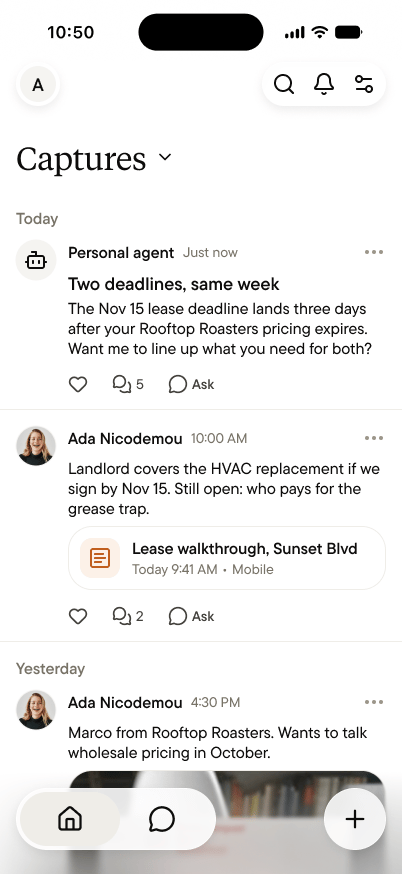
The Captures feed in a Personal space, with a note from a lease walkthrough and a post from the personal agent

What you’re looking at

Your Personal space has two tabs:
  • Home shows your feeds, starting with Captures. Your notes, your posts, and your personal agent’s posts appear newest first, grouped by day. Tap any note to open it.
  • Chat is your conversation with your personal agent.
Tap the avatar at the top left to open the space switcher, where your Personal space is always first.

Why it adds up

Most tools store what you give them and wait. Your Personal space builds on itself: every capture adds to what your personal agent can answer, sharpens who’s who in your world, and deepens the context behind every future question. A week of notes is useful. Six months is something no other tool has ever had about you, and it’s yours alone.

Finding things again

Search, at the top right of Home, covers everything in your Personal space: titles, Summaries, transcripts, and people. Search a name to find every conversation they appear in, or a topic to find every time it came up. For questions rather than lookups, like “where did we leave the Sunset lease?”, ask your personal agent instead. That’s what it’s for.

Private means private

Your Personal space has no members, no invites, and no admin view. Nothing in it reaches a teammate or a team space. The only way something leaves is a share link you create yourself, one note at a time. See What “private by default” means.

Your Personal space and your team spaces

If you’re also in a team space, your Personal space stays exactly as it is. The two never mix. What you capture in your Personal space stays there, and what you capture in a team space belongs to that team. Capture each thing where it belongs.