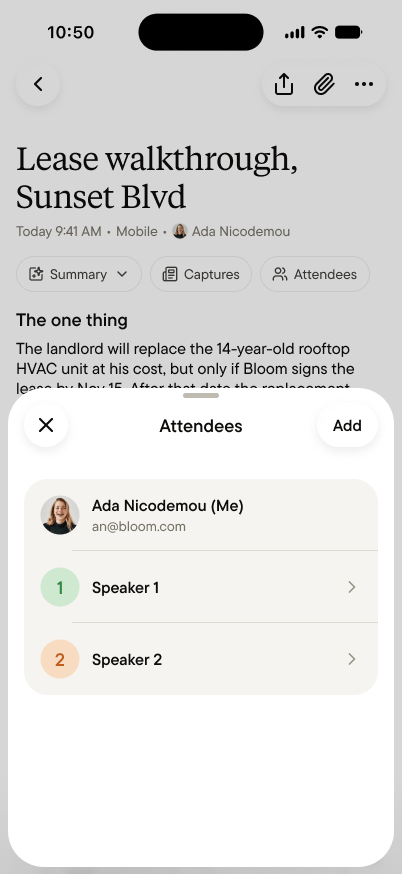
Every note carries its attendees: the people who were part of the conversation. They’re how your memory stays a memory of people, not just of words: who said the thing, who made the promise, who you keep meaning to follow up with. Tap Attendees at the top of a note to see them.
The Attendees sheet on a note, listing three people and an Add attendee button

Adding and correcting

Gobi doesn’t know anyone’s name. It tells voices apart and labels them in the transcript as Speaker 1, Speaker 2, and so on. Naming them is up to the person who captured the note: add attendees, edit a name, or remove someone who wasn’t really part of it. A first name is enough, and you can add more when it’s useful (“Daniel Park, landlord’s broker”). Naming does double duty: once you match a speaker to an attendee, every turn that speaker took in the transcript shows their name. Fix a name once, and it’s fixed everywhere in the note.

The same person, across notes

Use the same name for the same person, and your notes connect. Ask your agent about Daniel, and it draws on every conversation Daniel appears in: the walkthrough last week, the call last month, the promise from yesterday. That’s how “who was there” becomes memory of a relationship, one name at a time.

What your agent does with them

Attendees are context your agent can use. “When did I last talk to Luis?” “What has Daniel said about the grease trap, across everything?” Questions like these work because attendees tie conversations to people. The more carefully you keep attendees, the sharper the answers.

Who can see them

Attendees travel with the Summary. In your Personal space, only you see them. In a team space, every member who can see the feed sees the Summary and its attendees, and so does anyone you share the note with by link. That’s how the team knows who was in the room. See Who sees what.