

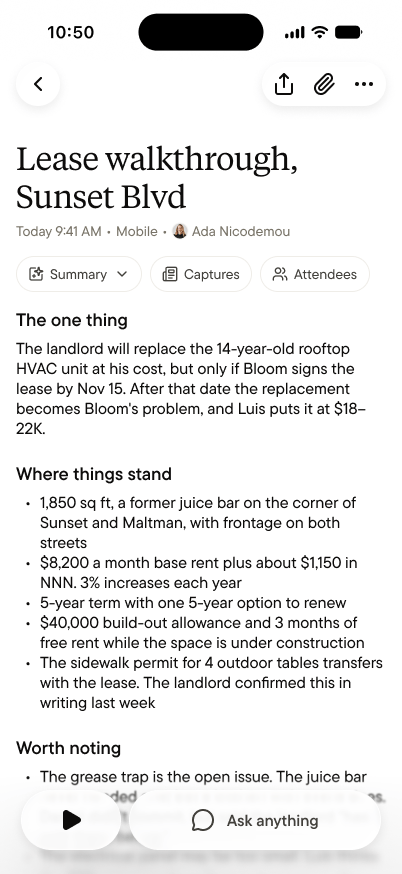
The header
Every note opens with what, when, and who: a title Gobi writes from the conversation itself, when it happened, and who captured it. Below that are three chips:- Summary ▾ switches between the Summary, the transcript, and your side notes.
- The feed chip shows which feed the note lives in.
- Attendees shows who was part of the conversation. See Attendees.
The Summary
The Summary is what you’ll read most. It has four sections.The one thing
The answer to “what actually mattered here?”, in one finding, stated plainly. It’s not a recap but a verdict: the budget owner isn’t who you thought, the timeline moved, the deal’s real blocker surfaced. If you read nothing else, read this.Where things stand
The state of play, point by point: what’s settled, what’s blocked, what changed. The points are short, so the section scans in seconds.Worth noting
The subtext: what was said between the lines, hesitations worth remembering, the thing that might matter in a month. A transcript shows that words happened. This section notices what they meant.Next steps
What happens now, as a plain list of commitments, follow-ups, and deadlines, with who owns each one when the conversation made it clear. If you promised something, it’s here waiting for you. The Summary is yours to edit. If Gobi got something wrong, fix it, and your agent works from the corrected version.Who sees what
A note lives in the space where you captured it, and different parts reach different people.
The person who captured a note always sees all of it. Everyone else sees the Summary and attendees, and nothing more.
Share a note
Sometimes a note should reach someone who isn’t in the space, like a client after a meeting or the person across the table who asked for a copy. Tap Share at the top of the note to create a link.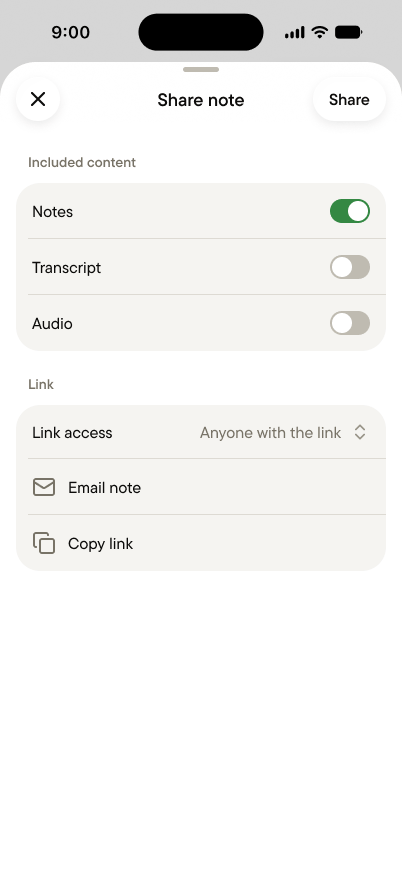
- Only the person who captured a note can share it.
- The Summary is always included. The transcript and audio are off unless you turn them on. Side notes and attachments never go into a link.
- Anyone with the link can read what you included, without signing in. They can’t edit it or reply.
- You can turn the link off at any time, and it stops working right away. Deleting the note turns it off too.
- The link shows the current version. If you edit the Summary after sharing, people with the link see the edit.
Ask about it
Tap Ask anything at the bottom of any note to ask about it: “what exactly did Daniel say about the grease trap?” or “draft a follow-up to Luis.” In your Personal space, your personal agent answers. In a team space, the space agent does.A note isn’t a document to file. It’s memory in its useful form. Read it once while it’s fresh, add a side note if something needs one, and let it build up with everything else. When you need it again, you won’t go looking. You’ll just ask.