


How Gobi works
1
Capture
Tap + and start a voice note, and the conversation is captured as it happens: a meeting, a call, a thought out loud. Or post something: a few lines of text, a photo, a scanned document, or a file.
2
Share it with your agent and your team
Everything you capture lands in a feed. Your agent reads it, and in a team space, so does your team. A voice note becomes a note, with a Summary of what mattered: where things stand, who was there, and what happens next.
3
It accumulates
Every capture adds to what your agent knows. Ask it anything across everything you’ve captured, from one post or from Chat.
4
Automate it with a workflow (coming soon)
Attach a workflow to a feed and the agent works on a cadence. Post invoice photos into an Invoices feed all week, and the agent sends a report every Monday.
Two kinds of space
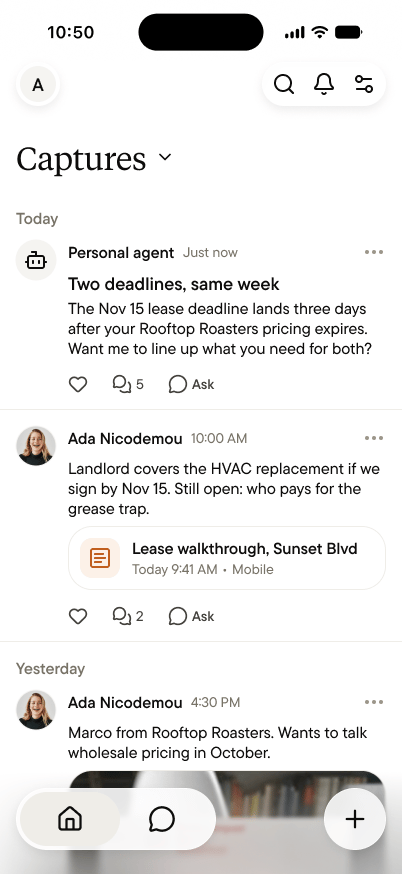
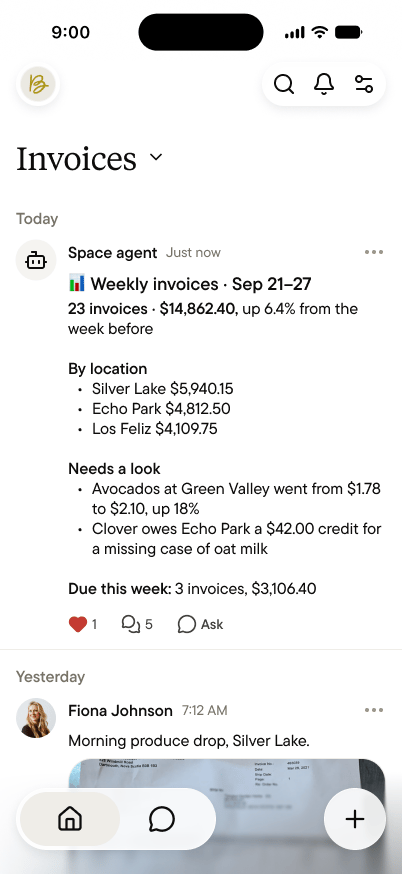
Start here
Quick start
From download to your first note in under two minutes.
Download Gobi
iPhone and Android. Free to start.
Feeds
Where everything in Gobi lives, and how to keep the same kind of thing together.
Connect your agent
Give Claude Code, Codex, or Cursor the context of a space.
Core concepts
Capture: The act of getting something into Gobi, either a voice note or a post. You decide when to capture; nothing is captured on its own. Note: What a voice note becomes. A note holds a Summary, the full transcript and audio, your side note, and any attachments. Feed: A stream of posts and notes, from people and the agent, in the order they happened. Every space is made of feeds, starting with Captures. Personal space: Yours alone. Your personal agent answers from everything in it. Team space: Where a team captures toward a shared goal, with a space agent that answers from its public feeds.Why use Gobi
Your best conversations stop vanishing. The meeting, the call, the hallway idea: captured as they happen and turned into a Summary, people, and next steps, instead of typed from memory at midnight. Your memory compounds. Most tools store what you type; Gobi accumulates understanding. Every capture makes your agent better at the next question: who said what, where things stand, what you promised. Your team stops writing recaps. Everyone captures into the same feeds, and the space agent keeps up with all of it. What one person heard becomes what everyone knows. Private until you share. Your Personal space has no members and no invites. A note leaves it only when you share it by link, and you choose whether the transcript and audio go with it. Gobi doesn’t train on your conversations.Who Gobi is for
People whose work happens in person. Founders, sellers, consultants, and anyone whose most important conversations happen face to face, where nothing else keeps a memory. Teams that work on site. Teams on the floor, in the field, or on the road, where what one person sees should become what everyone knows, without anyone writing it up. People who run agents. You already work with Claude, Codex, or your own agentic setup, and it knows everything you’ve typed and nothing you’ve lived. Gobi is the missing input.What you can capture
Conversations and meetings. Start a voice note and the conversation becomes a note with a Summary, a transcript, and next steps. Thinking out loud. A voice note between meetings: the fastest way to get a thought into Gobi. Photos, scans, and files. Post a receipt, a whiteboard, a scanned document, or a file, with a few lines of context.The essentials
What's in a note
The Summary, transcript, side note, and attachments, and who sees each.
Private by default
What stays yours, and what happens when you share.
What agents can and can't see
Your personal agent, the space agent, and your teammates, with clearly drawn lines.
FAQ
Short, honest answers, including what’s coming next.