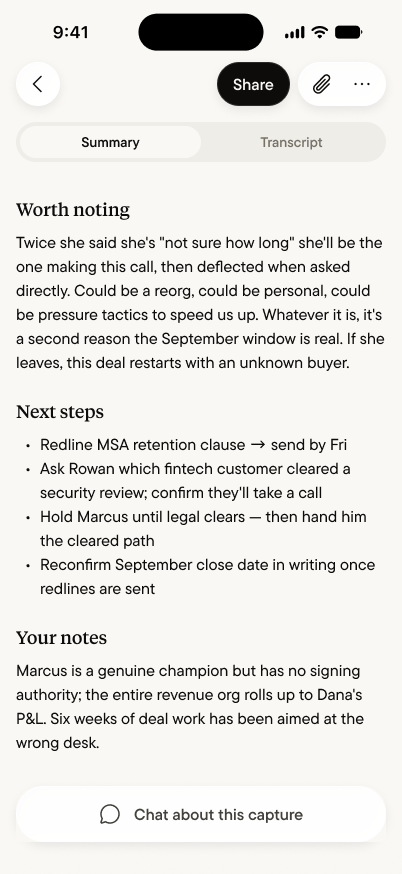
Every Summary has a section that Gobi never writes: Your notes — your own words, in your own voice, living alongside the AI’s understanding of the conversation. What you noticed, what you suspect, what the room couldn’t say out loud.

Write them as it happens
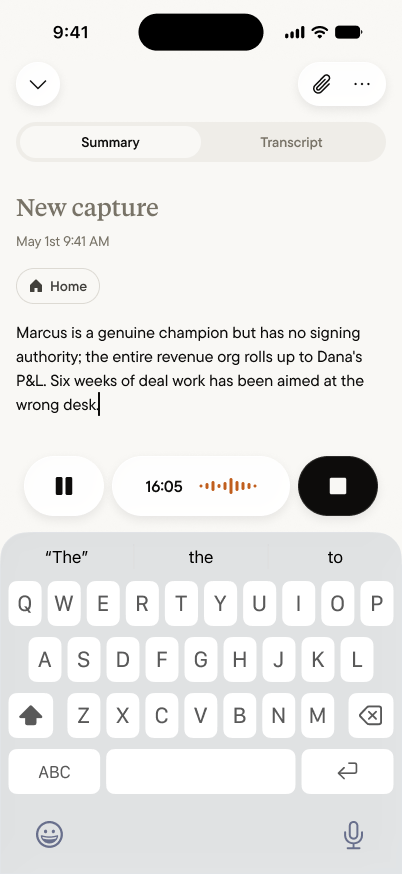
Typing a note while a capture is running
You don’t have to wait for the Summary. During a capture, type straight into the note field — the capture keeps running, the transcript keeps listening, and your thought lands exactly where it belongs. The judgment you’d otherwise lose (“she hesitated — something’s off”) gets written in the moment it exists.

Or add them after

Your notes on the finished Summary
On any Summary, your notes sit at the bottom — add to them, edit them, or write your first one long after the conversation ended. Notes written during the capture arrive here automatically; the during and the after are one section.

What notes are for

The Summary captures what was said. Your notes hold what only you know:
  • The read. “Marcus is a champion but can’t sign — we’ve been aimed at the wrong desk.” The conclusion you drew, not the words that led there.
  • The context Gobi couldn’t hear. What happened before the capture started, the email that prompted the meeting, the history behind a loaded comment.
  • The private judgment. What you’d never say in the room and wouldn’t share to the team — notes stay part of your capture, private by default like everything else, and travel only if you share the capture.

Your agent reads them too

Notes aren’t an appendix — they’re context. When you ask your personal agent about a deal or a person, it draws on your notes alongside the transcript and Summary. Write “I don’t trust this timeline” today, and a month from now, “what were my concerns about Cintra?” surfaces it. Your judgment compounds with everything else.