> ## Documentation Index
> Fetch the complete documentation index at: https://docs.gobihq.com/llms.txt
> Use this file to discover all available pages before exploring further.
# Attendees
> Who was in the conversation, on every capture.
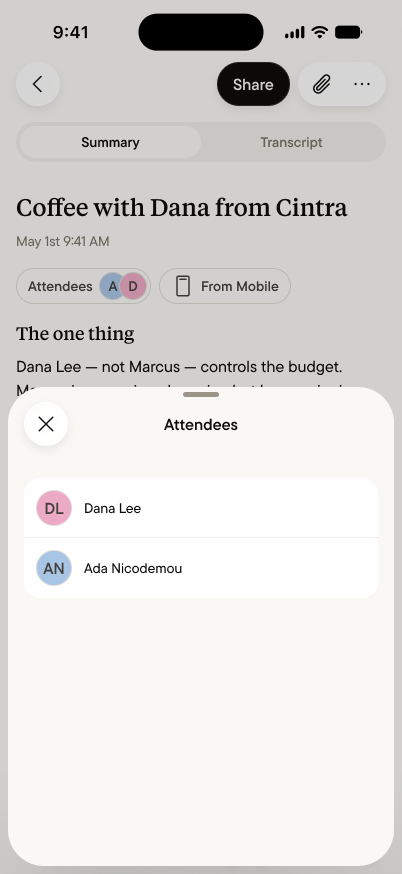
Every capture carries its attendees — the people who were part of
the conversation, shown as chips on the Summary. They're how your
memory stays a memory of *people*, not just of words: who said the
thing, who made the promise, who you keep meaning to follow up
with.
 ## Adding and correcting
Attendees are yours to set. Tap the chips on any Summary to add
someone, correct a name, or remove someone who wasn't really part
of it — the same way you'd fix the attendee line in a meeting Summary.
A first name is enough; add more when it's useful ("Dana Lee,
Cintra").
Corrections do double duty: speakers in the
[transcript](/summary/transcripts) are matched to the capture's
attendees, so fixing a name once fixes every turn they spoke.
## The same person, across captures
Use the same name for the same person, and your captures connect:
ask your [personal agent](/personal-core/personal-agent) about
Dana, and it draws on every conversation Dana appears in — the
coffee last week, the intro last month, the promise from
yesterday. That's how "who was there" becomes relationship memory:
one name at a time, written by you.
## What your agent does with them
Attendees are context your agents can use. "When did I last talk
to Marcus?" "What has Dana said about pricing, across everything?"
"Who did I meet at SaaStr?" — these questions work because
attendees anchor conversations to people. The richer your
attendee habit, the sharper the answers.
## Private, like everything else
Attendees are part of the capture, and captures are
[private by default](/personal-core/private-by-default). Noting
that you met Dana is your note, in your core, visible to no one —
exactly as private as writing her name in a notebook, and exactly
as shared as you choose to make it. If you
[share a capture](/spaces/share-a-capture) to a Space, its
attendees travel with it — that's how "the team's memory of the
Cintra deal" knows who's who.
## Adding and correcting
Attendees are yours to set. Tap the chips on any Summary to add
someone, correct a name, or remove someone who wasn't really part
of it — the same way you'd fix the attendee line in a meeting Summary.
A first name is enough; add more when it's useful ("Dana Lee,
Cintra").
Corrections do double duty: speakers in the
[transcript](/summary/transcripts) are matched to the capture's
attendees, so fixing a name once fixes every turn they spoke.
## The same person, across captures
Use the same name for the same person, and your captures connect:
ask your [personal agent](/personal-core/personal-agent) about
Dana, and it draws on every conversation Dana appears in — the
coffee last week, the intro last month, the promise from
yesterday. That's how "who was there" becomes relationship memory:
one name at a time, written by you.
## What your agent does with them
Attendees are context your agents can use. "When did I last talk
to Marcus?" "What has Dana said about pricing, across everything?"
"Who did I meet at SaaStr?" — these questions work because
attendees anchor conversations to people. The richer your
attendee habit, the sharper the answers.
## Private, like everything else
Attendees are part of the capture, and captures are
[private by default](/personal-core/private-by-default). Noting
that you met Dana is your note, in your core, visible to no one —
exactly as private as writing her name in a notebook, and exactly
as shared as you choose to make it. If you
[share a capture](/spaces/share-a-capture) to a Space, its
attendees travel with it — that's how "the team's memory of the
Cintra deal" knows who's who.