> ## Documentation Index
> Fetch the complete documentation index at: https://docs.gobihq.com/llms.txt
> Use this file to discover all available pages before exploring further.
# Join a space
> Spaces are invitation-only. Here's what happens when yours arrives.
Everything you capture lives in your private Home. A **space** is
the other half of Gobi: a place a team, a company, or a group of
people share into together. You don't browse or search for
spaces — you get invited to one.
## The invite link
Most invitations arrive as a link — in a text, an email, a Slack
message. Invite links look like `gobispace.com/htkzmak`, or a
named one like `gobispace.com/acme`. Tap it, confirm, and you're
in — no application, no waiting for approval.
If you don't have Gobi installed yet, the link takes you through
the App Store first, and your invitation is waiting when you open
the app.
## Invites waiting in the app
Some invitations skip the link entirely — a space member invites
you directly, and the invite arrives in Gobi itself. Find yours
in **Account settings → Invites**:
 Each invite shows the space, its size, and who invited you —
accept or decline right there. Nothing joins on your behalf: an
invitation waits until you answer it.
## Or enter a link yourself
If your invite link is sitting on another device or buried in a
thread, you can join by hand — choose **Join with a link** from
the Invites screen, or **Join an existing space** from the
Spaces tab:
Each invite shows the space, its size, and who invited you —
accept or decline right there. Nothing joins on your behalf: an
invitation waits until you answer it.
## Or enter a link yourself
If your invite link is sitting on another device or buried in a
thread, you can join by hand — choose **Join with a link** from
the Invites screen, or **Join an existing space** from the
Spaces tab:
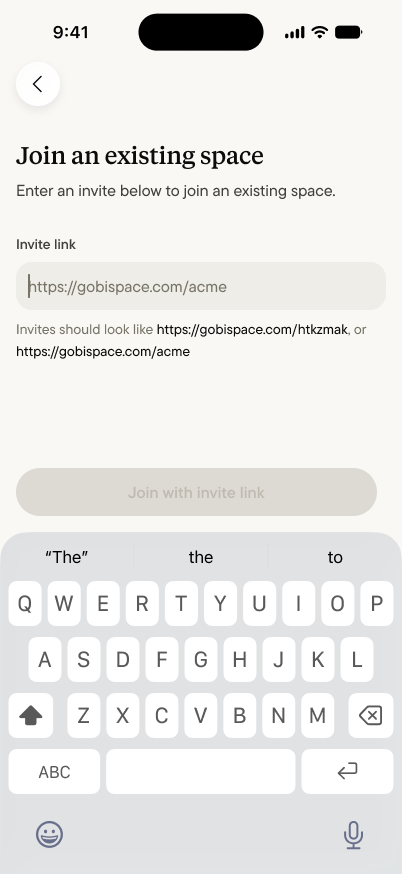 Paste or type the link and join. If you can't find yours, ask
whoever invited you to send it again — or to invite you directly,
so it lands in your Invites.
## What joining does — and doesn't
Joining a space adds a place you can share into. It doesn't open
a window into your Home:
* **Nobody sees your captures.** Your Home stays yours. Joining
a space exposes nothing you've captured — sharing is a decision
you make [one capture at a time](/spaces/share-a-capture).
* **You see what's shared with you.** Inside a space, life
happens in [channels](/spaces/channels) — what you see depends
on the channels you're part of.
* **Leaving is clean.** What you shared into the space was shared
by choice; what you never shared was never there.
## Once you're in
The space appears in your Spaces tab alongside any others you
belong to, its activity starts arriving in your
[Inbox](/spaces/inbox), and its [space agent](/spaces/space-agent)
is ready to answer questions from what the space knows. Start by
reading the room — then share something worth remembering.
Paste or type the link and join. If you can't find yours, ask
whoever invited you to send it again — or to invite you directly,
so it lands in your Invites.
## What joining does — and doesn't
Joining a space adds a place you can share into. It doesn't open
a window into your Home:
* **Nobody sees your captures.** Your Home stays yours. Joining
a space exposes nothing you've captured — sharing is a decision
you make [one capture at a time](/spaces/share-a-capture).
* **You see what's shared with you.** Inside a space, life
happens in [channels](/spaces/channels) — what you see depends
on the channels you're part of.
* **Leaving is clean.** What you shared into the space was shared
by choice; what you never shared was never there.
## Once you're in
The space appears in your Spaces tab alongside any others you
belong to, its activity starts arriving in your
[Inbox](/spaces/inbox), and its [space agent](/spaces/space-agent)
is ready to answer questions from what the space knows. Start by
reading the room — then share something worth remembering.