> ## Documentation Index
> Fetch the complete documentation index at: https://docs.gobihq.com/llms.txt
> Use this file to discover all available pages before exploring further.
# Create a space
> A space is born empty. It only ever knows what its members share.
If your team, your company, or your group doesn't have a space
yet, make one — creating a space is open to everyone, takes a
minute, and costs nothing.
## Name it, and it exists
From the **Spaces** tab, choose **Create a space**. There's one
thing to decide: what it's called.
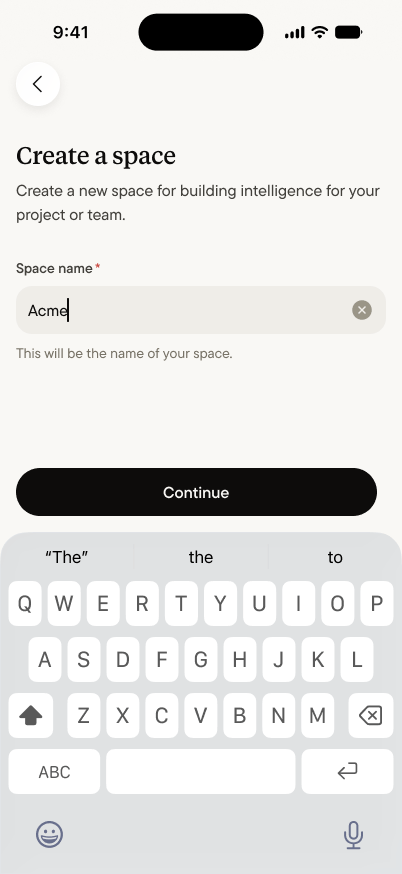 No setup wizard, no configuration to get right before you start.
A space begins as an empty room with your name on the lease —
and two things are true about every new one:
* **It starts empty.** Nothing you've captured moves into it.
A space only ever contains what members deliberately
[share into it](/spaces/share-a-capture) — that stays true on
day one and every day after.
* **You're the admin.** Creating a space makes you its
administrator: you manage
[members and settings](/spaces/settings-and-members), and you
can make other members admins alongside you.
## Bring your team
A space becomes real when the second person joins, so inviting
is the next screen, not a settings hunt:
No setup wizard, no configuration to get right before you start.
A space begins as an empty room with your name on the lease —
and two things are true about every new one:
* **It starts empty.** Nothing you've captured moves into it.
A space only ever contains what members deliberately
[share into it](/spaces/share-a-capture) — that stays true on
day one and every day after.
* **You're the admin.** Creating a space makes you its
administrator: you manage
[members and settings](/spaces/settings-and-members), and you
can make other members admins alongside you.
## Bring your team
A space becomes real when the second person joins, so inviting
is the next screen, not a settings hunt:
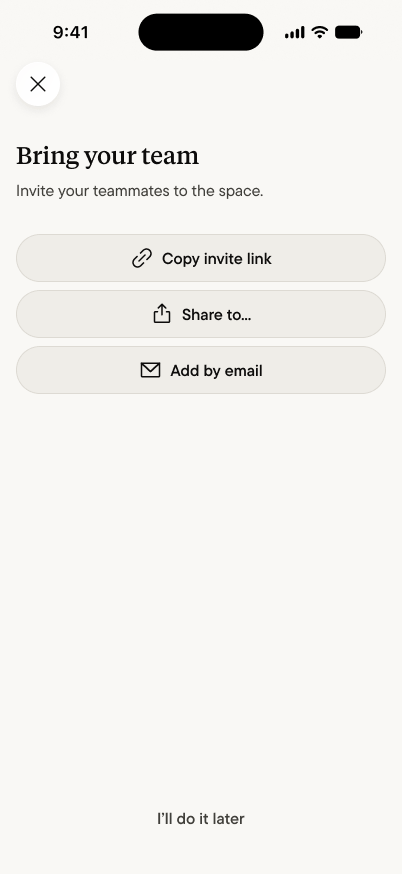 Three ways in, for three situations: **copy the invite link** and
paste it wherever your team already talks, **share it** straight
from your phone, or **add people by email** — an email invite
lands [waiting in their app](/spaces/join-a-space), no link
required. In a hurry? Skip it — inviting is always available
later from the space's members screen.
## First moves
An empty space is a room waiting for a conversation. In whatever
order suits you:
* **Shape the rooms.** [Channels](/spaces/channels) give the
space its structure — by deal, by client, by topic, however
your group actually talks.
* **Share the first capture.** The best empty-space cure is a
real conversation: share a capture worth discussing, and the
space starts life with something to say.
## What the space knows
As members share captures and the conversation accumulates, the
space develops something none of its members has alone: a
collective memory. That's what the
[space agent](/spaces/space-agent) draws on when anyone asks it a
question — not your Home, not anyone's private captures, only
what the space was given. A space is exactly as smart as what
its members choose to share.
Three ways in, for three situations: **copy the invite link** and
paste it wherever your team already talks, **share it** straight
from your phone, or **add people by email** — an email invite
lands [waiting in their app](/spaces/join-a-space), no link
required. In a hurry? Skip it — inviting is always available
later from the space's members screen.
## First moves
An empty space is a room waiting for a conversation. In whatever
order suits you:
* **Shape the rooms.** [Channels](/spaces/channels) give the
space its structure — by deal, by client, by topic, however
your group actually talks.
* **Share the first capture.** The best empty-space cure is a
real conversation: share a capture worth discussing, and the
space starts life with something to say.
## What the space knows
As members share captures and the conversation accumulates, the
space develops something none of its members has alone: a
collective memory. That's what the
[space agent](/spaces/space-agent) draws on when anyone asks it a
question — not your Home, not anyone's private captures, only
what the space was given. A space is exactly as smart as what
its members choose to share.