> ## Documentation Index
> Fetch the complete documentation index at: https://docs.gobihq.com/llms.txt
> Use this file to discover all available pages before exploring further.
# Capture on your phone
> One tap, and the conversation lands in your core.
Capturing is the one habit Gobi asks of you. Everything else —
the Summary, the accumulating core, the answers your agent gives —
flows from this. Here's how it works, start to stop.
## Start a capture
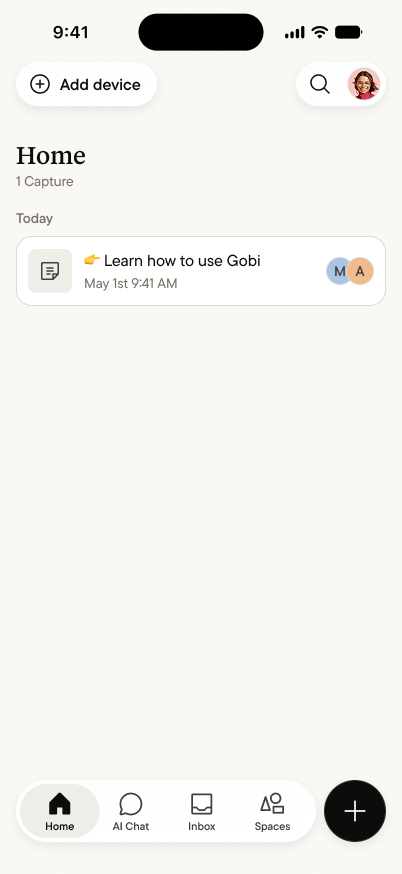 Tap the **+** button — it's with you on every tab. A capture can be
a conversation, a meeting, a voice memo to yourself, a typed note,
or a photo. For anything spoken, just start talking; Gobi listens
from the moment you begin.
Capturing with someone across the table? A simple "mind if I
capture this?" is all it takes — most people say yes, and
[here's how to handle it gracefully](/capture/with-people-around).
## While you're capturing
Tap the **+** button — it's with you on every tab. A capture can be
a conversation, a meeting, a voice memo to yourself, a typed note,
or a photo. For anything spoken, just start talking; Gobi listens
from the moment you begin.
Capturing with someone across the table? A simple "mind if I
capture this?" is all it takes — most people say yes, and
[here's how to handle it gracefully](/capture/with-people-around).
## While you're capturing
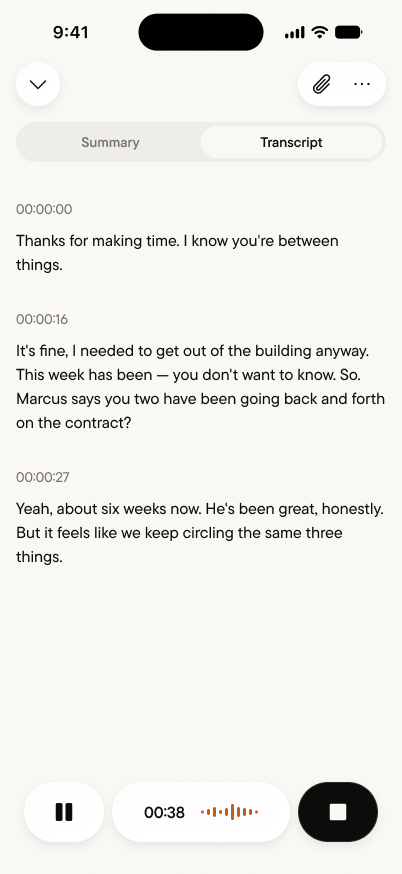 The transcript appears live as the conversation happens — a quiet
confirmation that Gobi is hearing what you're hearing. The
controls stay simple:
* **Pause** when the conversation goes somewhere that doesn't need
capturing; tap again to resume.
* **Stop** when you're done. There's nothing to save — stopping is
saving.
Your phone can go back in your pocket mid-capture. The capture
continues; your attention belongs to the person in front of you.
## Choose where it lands
The transcript appears live as the conversation happens — a quiet
confirmation that Gobi is hearing what you're hearing. The
controls stay simple:
* **Pause** when the conversation goes somewhere that doesn't need
capturing; tap again to resume.
* **Stop** when you're done. There's nothing to save — stopping is
saving.
Your phone can go back in your pocket mid-capture. The capture
continues; your attention belongs to the person in front of you.
## Choose where it lands
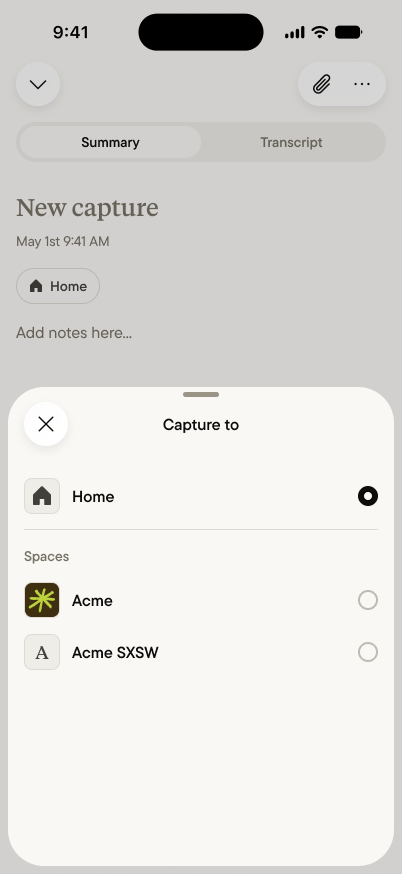 Every capture lands in your **Home** — your private core — by
default. If a capture belongs somewhere specific, point it there as
you start: captures routed to a Space arrive already shared, with
nothing to move later. Purpose first, capture second.
## When you stop
Every capture lands in your **Home** — your private core — by
default. If a capture belongs somewhere specific, point it there as
you start: captures routed to a Space arrive already shared, with
nothing to move later. Purpose first, capture second.
## When you stop
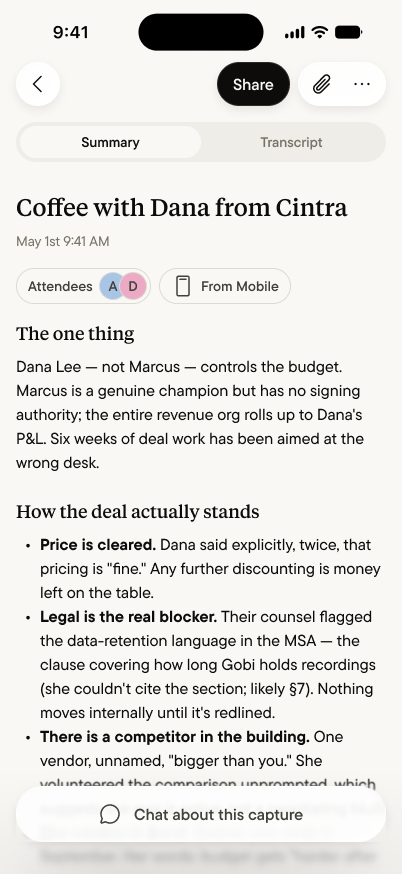 The moment you stop, Gobi gets to work. Within moments the capture
becomes a [Summary](/summary/overview) — the one thing that
mattered, where things stand, who was there, what's next — with
the full transcript one tab away. Add
[your own notes](/summary/your-notes), correct the
[attendees](/summary/attendees), or
[share it to your team](/spaces/share-a-capture) — or do nothing,
and it simply becomes part of what your agent knows.
## Good captures, honestly
* **Closer is better.** Phone on the table beats phone in the bag;
a noisy room is workable, a noisy room at arm's length is better.
* **Names help.** When people say each other's names in
conversation, the transcript and attendees get sharper.
* **Short is fine.** A thirty-second voice memo is a real capture.
The habit matters more than the length.
The moment you stop, Gobi gets to work. Within moments the capture
becomes a [Summary](/summary/overview) — the one thing that
mattered, where things stand, who was there, what's next — with
the full transcript one tab away. Add
[your own notes](/summary/your-notes), correct the
[attendees](/summary/attendees), or
[share it to your team](/spaces/share-a-capture) — or do nothing,
and it simply becomes part of what your agent knows.
## Good captures, honestly
* **Closer is better.** Phone on the table beats phone in the bag;
a noisy room is workable, a noisy room at arm's length is better.
* **Names help.** When people say each other's names in
conversation, the transcript and attendees get sharper.
* **Short is fine.** A thirty-second voice memo is a real capture.
The habit matters more than the length.